
In today’s increasingly digital education landscape, cybersecurity is no longer a luxury, it’s a foundational requirement. Yet, many primary schools, particularly those serving students in Years 1 to 6, continue to face a persistent and unresolved challenge: implementing multi-factor authentication (MFA) for students who do not have access to mobile phones or personal email accounts.
Importantly, MFA is not just a best practice, it is a core requirement under widely adopted cybersecurity frameworks, including the Australian Cyber Security Centre’s Essential Eight and the NIST Cybersecurity Framework (CSF). These standards emphasise MFA as a critical control for protecting user identities.
Fortunately, the landscape is changing. A growing number of affordable, child-friendly MFA alternatives are now available, enabling schools to strengthen their security posture without requiring students to own personal devices or manage complex credentials.

Multi-factor authentication (MFA) is a security mechanism that requires users to verify their identity using two or more distinct factors, typically something they know (like a password), something they have (like a phone or token), or something they are (like a fingerprint). MFA significantly reduces the risk of account compromise by making it harder for attackers to gain access, even if passwords are stolen or guessed.
However, traditional MFA methods, such as sending a one-time code to a mobile phone or email, are not suitable for children aged 5 to 12. In our assessments of cybersecurity practices across multiple schools, we consistently found this issue listed as a long-standing risk in IT risk registers, often flagged but unresolved due to practical limitations. The key challenges include:
• Phones and emails are uncommon: Most students in this age group do not own smartphones or have personal email accounts, and in many schools, mobile phone use is restricted or prohibited on campus. This makes standard MFA channels like SMS codes or email verification inaccessible for younger learners.
• Digital literacy is still developing: Young children may struggle with complex login procedures, especially those involving multiple steps.
• Privacy concerns are paramount: Schools and families are cautious about exposing children to unnecessary data collection or requiring them to manage personal credentials.
As a result, many schools opt to disable MFA for students entirely, relying instead on simple passwords, which leaves student accounts highly vulnerable to unauthorised access and exploitation.
To address this, MFA solutions must be age-appropriate, easy to use, and device-independent, favouring visual or biometric methods that integrate smoothly with school-managed systems. Fortunately, several innovative options now meet these needs without compromising accessibility or security.
Skipping multi-factor authentication (MFA) in schools creates a serious security gap. Without MFA, student accounts are easy targets for attackers and can serve as entry points into broader school systems, leading to:
• Compromised learning platforms
• Theft or manipulation of student records
• Exposure of sensitive health or behavioural data
• Disruption of classroom operations
Beyond technical risks, breaches can damage a school’s reputation, increase insurance costs, and trigger regulatory scrutiny. MFA is now considered a baseline control by cybersecurity insurers and auditors, and its absence is often flagged during audits and compliance reviews.
As schools strive to meet cybersecurity standards, implementing multi-factor authentication can be a major hurdle. The challenge isn't just about finding a solution; it's about finding one that's practical for young learners and fits within a school's budget and IT capabilities. Fortunately, the market is evolving, offering several MFA options designed specifically for educational environments where traditional methods like phone-based verification are impractical. These alternatives are cost-effective and built to align with classroom dynamics, offering a crucial balance of security, usability, and scalability without introducing unnecessary complexity.
One of the most promising approaches is pictograph-based authentication used as part of a multi-factor authentication (MFA) strategy, where visual sequences replace traditional text passwords as one factor. This method is particularly effective for younger students who may struggle with typing or complex password recall. Combined with an additional factor, it reduces login friction while maintaining security, improving engagement and lowering support overhead in busy school environments.
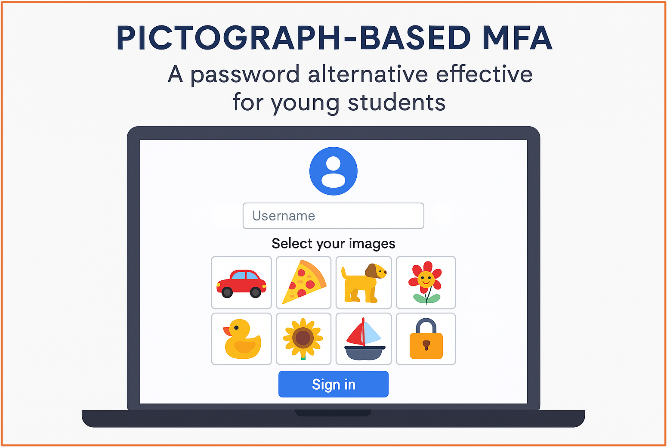
Below is a comparison of leading pictograph MFA platforms and their suitability for primary education settings:
.png)
While pictograph-based MFA is great for young students, a wider range of deviceless authentication methods can protect different age groups and user roles. These solutions are especially useful in environments where personal devices are unavailable.
Microsoft Passwordless MFA
Microsoft offers secure, device-integrated login options for schools using Entra ID. These include:
• Temporary Access Passes (TAP) for onboarding without phones or emails
• Windows Hello for Business for biometric login
• PIN-based authentication stored locally and resistant to phishing
These methods work well in Microsoft 365 environments and support compliance with key security standards.
Hardware Tokens
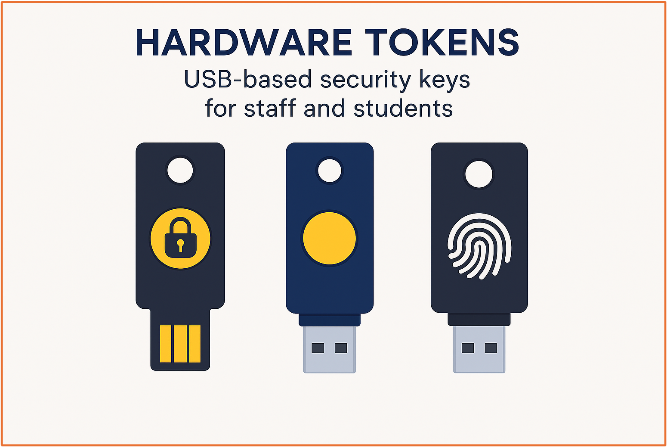
For staff and older students, USB-based hardware tokens offer a robust second factor without relying on mobile devices. These tokens are highly secure, resistant to phishing, and can be reused. Priced between $20–$50 per unit, they are a cost-effective solution for administrative access or remote login scenarios.
Biometric Authentication
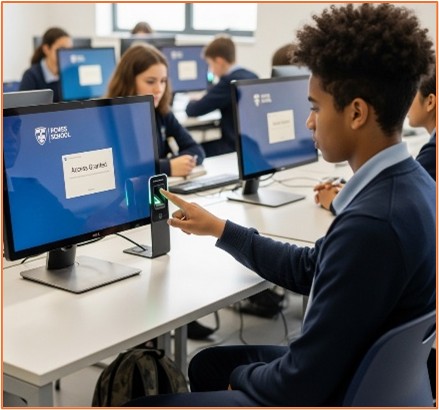
Biometric methods like fingerprint scanning or facial recognition offer a seamless login experience. They eliminate password fatigue, reduce errors, and enhance physical security. However, schools must carefully manage parental consent, data privacy, and device compatibility. Biometric data should be securely stored and used within the bounds of local privacy regulations.
For schools using managed Apple devices, several robust MFA solutions integrate seamlessly with macOS and iOS. These options layer on top of Apple's security frameworks, offering age-appropriate authentication for students and staff.
Jamf + Okta Integration: This combination provides frictionless, biometric-enabled logins (Face ID/Touch ID) for a secure, passwordless experience. It supports zero-trust and conditional access policies for both students and staff.
Duo Security (by Cisco): Duo Security offers Apple-native MFA that integrates with Apple School Manager and Jamf, enabling schools to leverage trusted, managed devices for low-friction student authentication. Through adaptive policies and push-based approval, Duo reduces login complexity for younger students while still providing strong security and centralised management for IT teams.
Auth0 (by Okta): This platform provides flexible MFA options like pictograph-style login and device biometrics, working well with Apple environments and educational platforms.
Apple Face ID / Touch ID: Built directly into Apple devices, these biometrics provide a simple, password-reducing login method. Many educational apps support this feature, making it ideal for young students.
Yubico Security Keys: These hardware tokens are compatible with Apple devices via USB-C or NFC, providing phishing-resistant MFA for staff or older students without requiring software installation.
To successfully roll out MFA in a primary school, a phased approach is key. These tips can help streamline implementation and improve adoption:
1. Start with staff and older students: Use this initial group to test the system and refine the process before rolling it out to younger students.
2. Pilot pictograph MFA: Trial child-friendly solutions with a small group to evaluate ease of use and success rates before full deployment.
3. Train with age-appropriate materials: Provide simple, visual guides and hands-on support tailored to different age groups.
4. Engage parents: Explain the benefits of MFA and address any privacy concerns, particularly regarding biometrics.
5. Monitor and adapt: Collect feedback and use login analytics to track adoption and adjust as needed.
Spartans Security is an Australian cybersecurity provider that helps schools build robust, standards-aligned security programs. It offers a customised approach to MFA implementation, starting with a needs assessment to find the right solution for students, staff, and your school's IT environment.
The process includes:
• Requirements Assessment: Analysing your school's specific needs to choose a solution suitable for all users, including young children.
• Business Case Creation: Helping secure funding and stakeholder buy-in by demonstrating the value of MFA for compliance and risk reduction.
• Solution Implementation: Deploying and integrating deviceless and child-friendly MFA options like pictograph-based authentication and hardware tokens.
• Outcome Validation: Measuring the solution's effectiveness and updating your school's risk posture.
• Ongoing Support: Assisting with incident response and compliance reporting to ensure long-term security.
This structured approach makes security sustainable and inclusive. With increasing cyber threats, adopting age-appropriate solutions is crucial for replacing weak passwords, meeting cybersecurity standards, and building a safer digital environment for every child.


.png)

.png)